
You can easily import your manga library from an Excel file into MangaTime.
We support importing the following file formats: XLSX, XLS, CSV and TSV.
The file to import must be formatted as follows, we don't support having extra columns or searching the column name:
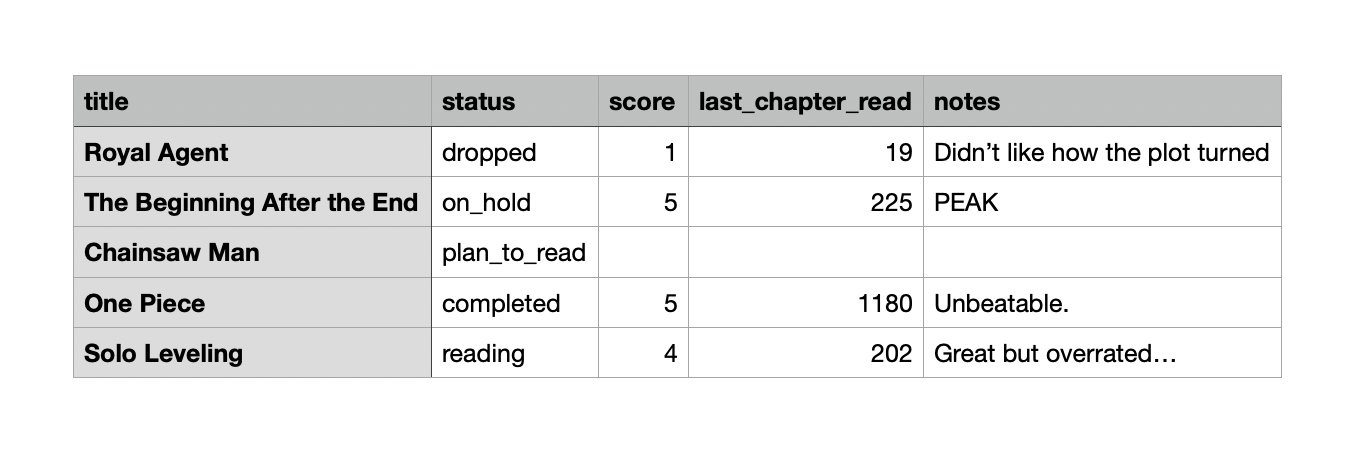
Here’s how to do it step-by-step:
Structure your Excel file to be compatible with out import
Head into to MangaTime
Open the Profile tab using the bottom navigation bar
Open up the Settings page by tapping on the gear icon in the top right corner
Press on Import from Excel
Tap on Select Excel File and pick the downloaded file from your downloads
Then press on Start Import, wait a few seconds (based on how big your library is) and TADAAA 🎉